Your inner work is yours.
Not as a promise. As the architecture.
ACE is built so the work you do inside it stays where it belongs — with you. This page is the system in plain view: every component, every data boundary, and every control you have. So you can see it, not just trust it.
Three commitments the architecture makes structural.
These aren't policy statements. They're how the system is built. If a future version of ACE moved away from any of these, it would no longer be the same system.
What flows out flows on purpose.
Anthropic receives only what you actively send through a chat. GitHub is optional — if you use it, the scaffolding migration limits it to system files only. Voice and MCP integrations are off until you turn them on. Every outbound edge is named, scoped, and reversible.
Updates flow toward you, not from you.
The Core engine sends new skills and schemas in. Your data does not flow back through that channel. The architecture is asymmetric in your favor — by design, not by exception.
How the pieces actually fit together.
Every component, every trust boundary, every gate you control — named precisely. Inside your laptop, ACE reading your vault is not a boundary crossing. It's all under your hand.
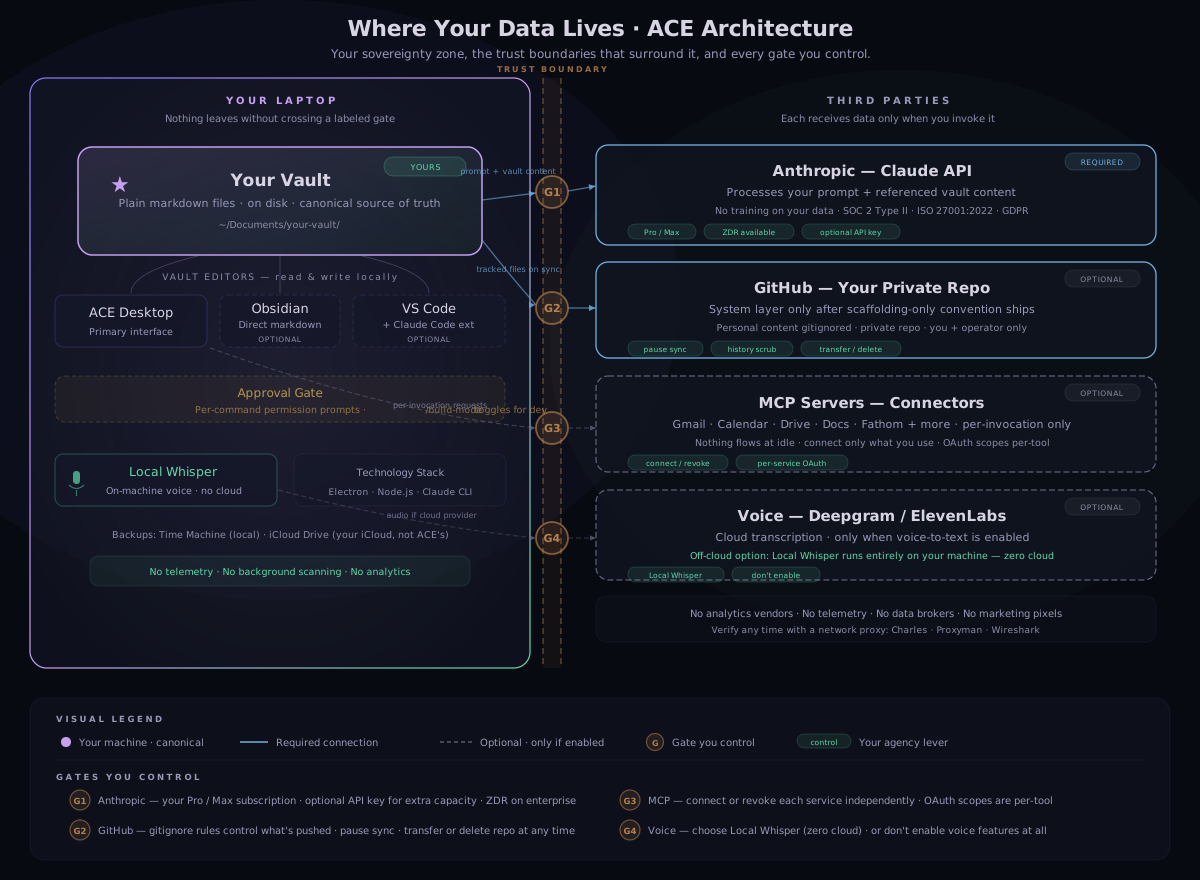
Every component, named and open.
Tap any component to see exactly what it is, what data touches it, who accesses it, and what you can do about it.
Your Vault
Local · Canonical source of truth
ON YOUR MACHINE
›
- What it is
- Plain markdown and JSON files stored in a folder on your laptop. The heart of the system. Every journal entry, decision, person file, domain plan, and state record lives here.
- Data handled
- Everything you create inside ACE — journals, network files, decisions, state, active work, domains, health tracking, artifacts.
- Who accesses it
- You. Any app you open it with (ACE Desktop, Obsidian, VS Code, any text editor). No one else can access your local filesystem remotely.
- Retention
- Forever — until you delete it yourself. Subject to your own backup setup.
- Training
- None. Local files are not accessed by any training pipeline.
- Your controls
-
delete folder = gone backup to iCloud / Time Machine move or rename freely
- How to verify
- Open
~/Documents/your-vault/in Finder. It's just files. System directories like.git/,.claude/, and.obsidian/are standard tooling — no telemetry configs, no background processes.
ACE Desktop
Local · Primary interface · Electron app
ON YOUR MACHINE
›
- What it is
- An Electron application running entirely on your machine. It reads vault files at session start and when skills require them — never in the background. Spawns Claude CLI to make AI calls.
- Data handled
- Reads vault files per-skill-invocation. Never indexes the full vault. No persistent in-memory vault cache.
- Security posture
- nodeIntegration: false, contextIsolation: true. No web server, no HTTP API, no admin routes. All internal communication via typed IPC channels defined in
src/ipc-channels.js. - Authentication
- You log in with your Claude Pro or Max subscription. If you also configure an API key for extra capacity, it lives in
ace-config.jsonin your local app data folder. Never written to vault, never transmitted anywhere beyond Anthropic. Operator has no access to your credentials. - External calls
- Makes exactly two types of external calls: Claude API (via Claude CLI), and optional MCP/voice providers you've connected. Verify with a network proxy.
- Your controls
-
quit app = no background processes log out anytime
Claude CLI
Local · Spawned by ACE Desktop · Calls Anthropic API
ON YOUR MACHINE
›
- What it is
- The
claude-codeCLI process spawned by ACE Desktop. Receives file context from the desktop, sends it to the Anthropic API over TLS, streams the response back. - Data flow
- Outbound: your prompt + vault content referenced by the active skill. Inbound: Claude's response. No other data is transmitted.
- Telemetry
- Has Statsig (latency metrics) and Sentry (error reporting) enabled by default. Neither sends code or file paths. Both can be fully disabled.
- Your controls
-
DISABLE_TELEMETRY=1 DISABLE_ERROR_REPORTING=1 log out / switch plan
- How to verify
- Set
DISABLE_TELEMETRY=1in your environment and proxy the network traffic. You'll see only Claude API calls and whatever MCPs you've enabled.
Obsidian
Local · Direct markdown vault editor
ON YOUR MACHINE
›
- What it is
- A local markdown editor that opens your vault folder directly. Not required to use ACE — it's just the most popular way to browse and edit vault files visually.
- Data handled
- Reads and writes the markdown files you open. Builds a local index for search (stored on your machine).
- External calls
- None by default. Community plugins may add connections to external services — review any plugin before installing.
- Sync
- Obsidian Sync is a paid Obsidian feature that syncs your vault to Obsidian's servers. Not connected in ACE's default setup. If you use it, that's an additional data surface you're choosing to open.
- Your controls
-
don't install Obsidian Sync audit community plugins
VS Code
Local · Editor with Claude Code extension
ON YOUR MACHINE
›
- What it is
- A code editor used alongside ACE Desktop for vault management. Not required for daily ACE use — most clients work entirely in ACE Desktop.
- Extensions we install
- Three extensions are part of the standard ACE setup:
- Claude Code — runs the same Claude CLI under the hood as ACE Desktop. Same data posture: vault content you reference + your prompt → Anthropic. Nothing more.
- Python — language support for any Python scripts in your vault (e.g., tools). Runs locally.
- Obsidian MD — markdown preview and wikilink support so vault files render properly. Runs locally.
- Data flow
- Python and Obsidian MD extensions are fully local — no external calls. The Claude Code extension has the same data posture as ACE Desktop (see Claude CLI above).
- Other extensions
- Any additional VS Code extensions you install may access your filesystem. Review what you've added beyond the three above.
Anthropic — Claude
Cloud · Required for AI · Your subscription
REQUIRED
›
- What it is
- The AI engine. Every Claude response goes through Anthropic's API over HTTPS. There's no way to use ACE's AI features without this connection.
- What flows there
- Your prompt + vault content actively referenced by the current skill. Nothing else. Outbound per-chat; response streams back.
- Training
- Excluded. Anthropic does not train on Pro, Max, or API conversations. This applies regardless of which plan tier you use. Per Anthropic privacy policy.
- Retention
- Varies by plan tier. Enterprise with ZDR: 0 days. Standard API: 30 days. Pro/Max: per Anthropic's consumer terms. Extended retention (2–7 years) only if a session is flagged by trust & safety for misuse.
- Certifications
- SOC 2 Type II · ISO 27001:2022 · ISO/IEC 42001:2023 · GDPR. TLS 1.2+ in transit. AES-256 at rest.
- Where it's processed
- Your machine connects directly to Anthropic's servers in the United States. The operator is not in the data path — your prompts go straight from your laptop to Anthropic, not through a middleman.
- Telemetry note
- Claude Code runs Statsig (latency) and Sentry (errors) by default. No code or file paths included. Both fully opt-out:
DISABLE_TELEMETRY=1andDISABLE_ERROR_REPORTING=1. - Your controls
-
Pro / Max subscription optional API key ZDR on enterprise DISABLE_TELEMETRY=1
- Audit-grade detail
- Claude Code Data Privacy & Security Report — 8 sections covering training, retention, telemetry, certifications, and ZDR with citations to official Anthropic documentation.
GitHub — Your Private Repo
Cloud · Optional · Weekly sync or manual push
OPTIONAL
›
- What it is
- A private repo at
actualize-ace/{your-vault-name}. You do not need to use it — nothing in ACE depends on GitHub to function. It was set up during onboarding for three practical reasons:1. Delivery — how your vault was delivered to your machine during setup.
2. Backup — a versioned copy of your system files, in case anything happens to your laptop.
3. Remote support — if you need help troubleshooting, your operator can review your system layer to diagnose issues.
If you prefer not to use GitHub, you can back up your vault folder any way you choose — iCloud, Time Machine, an external drive, or nothing at all. Your vault is just a folder of files.
- When data flows
- Only when you choose.
/close(session close) does not touch GitHub — it writes to local files only./weekly-reviewoffers an optional sync step at the end of each week. You can also push manually anytime withgit push. - What's stored (before scaffolding migration)
- Your full vault — system layer + personal content. This was the default during initial onboarding.
- What's stored (after scaffolding migration)
- System layer only — skills, schemas, configurations. All personal content is excluded by
.gitignoreand never pushed:state.md,active.md,inbox.md,sitrep.md,01-Journal/,04-Network/,Domains/,10-Health/,11-Artifacts/files/.How to apply the scaffolding migration
Run these commands in your vault folder to exclude personal content from future pushes:
cd ~/Documents/your-vault

# Add personal content paths to .gitignore
cat >> .gitignore <<'EOF'

# Personal content (scaffolding-only migration)
00-System/state.md
00-System/active.md
00-System/inbox.md
00-System/sitrep.md
01-Journal/
04-Network/
Domains/
10-Health/
11-Artifacts/files/
EOF

# Untrack those files going forward (keeps local copies)
git rm -r --cached 00-System/state.md 00-System/active.md \
  00-System/inbox.md 00-System/sitrep.md \
  01-Journal/ 04-Network/ Domains/ 10-Health/ \
  11-Artifacts/files/ 2>/dev/null

git add .gitignore
git commit -m "chore: scaffolding-only migration — exclude personal content"
git push
After this,
git ls-fileswill show only system files. Your personal files stay on your machine, untouched. If you also want to purge history (Option 2), ask your operator. - Who has access
- You (collaborator) and Nikhil (org owner — read + admin on
actualize-aceorg). Nobody else. Verified through GitHub org settings. - Training
- GitHub does not use private repo code for Copilot training without explicit opt-in.
- Retention
- Persists until you or operator deletes it. Note: git history retains old content even after files are removed — history scrub (Option 2) purges this.
- Your controls
-
don't use it at all pause sync scaffolding migration history scrub fresh start transfer to your accountSee Your Options below.
- How to verify
- Run
git ls-filesin your vault to see exactly what's tracked. Runcat .gitignoreto see what's excluded.
MCP Servers — Connectors
Cloud · Optional · Per-invocation only
OPTIONAL
›
- What it is
- Model Context Protocol servers that give ACE access to external services you choose to connect. Gmail, Google Calendar, Google Drive, Google Docs, Fathom (call recordings), and others.
- What flows there
- Per-invocation requests to the specific service. Example: when you invoke
/emails, a Gmail search request goes to Gmail. Nothing flows at idle. - Auth model
- Credentials are stored locally on your machine in three locations depending on the connector type:
~/Library/Application Support/ACE/ace-config.json— API keys (Deepgram, ElevenLabs, Anthropic)~/.google_workspace_mcp/credentials/— Google OAuth tokens~/.mcp-auth/— Fathom and other mcp-remote OAuth tokens
Each MCP has its own OAuth scope — connecting Gmail doesn't grant access to Drive, and vice versa.
- Retention at providers
- Per the underlying service's terms (Google, Fathom, etc.). ACE does not control retention at these providers.
- Built-in connectors
-
GmailSlack Google CalendarDiscord Google DriveStripe Google DocsAirtable Microsoft 365FluentCRM Fathom (call recordings)Zoom ActiveCampaignDeepgram GoHighLevelElevenLabs Telegram
Each connector only activates when you connect it. Connecting one service does not grant access to any other.
- Recommended third-party connector
- claude-code-telegram — an open-source Telegram bot that lets you interact with ACE from your phone. Not part of ACE — it's a community project we recommend. Review its code and privacy practices yourself before installing.
- Custom connectors & skills
- You can add your own MCP servers, connectors, and custom skills at any time. ACE's architecture is open to extension. Any connector or skill you add is your responsibility — review what data it accesses, where it sends data, and what permissions it requires. We can't audit third-party tools you bring in, so do your own due diligence before connecting anything to your vault.
- Your controls
-
connect per-service revoke OAuth anytime don't connect = no access
- How to verify
- Credentials are stored locally at three paths (macOS):
~/Library/Application Support/ACE/ace-config.json~/.google_workspace_mcp/credentials/~/.mcp-auth/
You can delete any of these directly or revoke via each service's security settings.
Voice & Dictation
Local + cloud options · Off by default
OPTIONAL
›
- Overview
- ACE supports voice-to-text through three options — from fully offline to cloud-enhanced. All are optional. None are active until you enable them.
- Local Whisper — available in ACE Desktop
- The OpenAI Whisper model running entirely on your machine. Requires a one-time download of the model file. Once installed, audio is transcribed locally — nothing leaves your laptop. Select it in ACE Desktop voice settings. This is the most private option.
- Deepgram — cloud provider
- Cloud speech-to-text with higher accuracy and speed. Audio recordings are sent to Deepgram's servers over HTTPS when you record voice input. Requires your own API key. Retention per Deepgram's terms.
- ElevenLabs — cloud provider
- Cloud speech-to-text via ElevenLabs'
scribe_v1model. Audio recordings are sent to ElevenLabs' servers over HTTPS. Requires your own API key. Higher accuracy for multilingual input. Retention per ElevenLabs' terms. - VoiceInk — recommended third-party app
- VoiceInk is a separate Mac dictation app — not part of ACE. We recommend it for system-wide voice-to-text outside of ACE Desktop. It uses Whisper locally by default. An optional cloud enhancement sends transcribed text (not audio) for grammar correction. Open source — you can inspect exactly what it does.
- Our role with VoiceInk
- We recommend it as a tool. We do not operate, host, or have any data relationship with it. Its privacy practices are its own.
- Your controls
-
choose Local Whisper use Deepgram use ElevenLabs try VoiceInk don't enable voice at all
The system has clear negative space, too.
Sovereignty is partly about what's present and partly about what's absent. Stating the absences out loud so they don't have to be guessed.
Updates flow toward you. Your data does not flow back.
The ACE Core engine is the operator-maintained source for skills, schemas, and configurations. /sync-core pulls updates into your vault. The flow is asymmetric — by design.
What /sync-core touchesSkills, schemas, specs — scoped precisely to the manifest
›
Updated: Skills (.claude/skills/), schemas (00-System/schema/), specs, bootstrap templates, base configurations.
Never touched: Your journal, decisions, state, network, finances, domains, custom skills, or anything you've authored.
Direction: One-way. Operator → Public Core → Your vault. Your data does not flow out through this channel.
How to verify: Read .ace/core-manifest.txt in your vault. Every path that can be touched is listed there.
GitHub is optional. Here's how to use it on your terms.
Nothing in ACE requires GitHub to function. Your vault is a local folder — it works the same whether GitHub is connected or not. If you do use it, here are the options you have.
Don't use it
Disconnect GitHub entirely. Back up your vault folder however you prefer — iCloud, Time Machine, an external drive, or your own solution. If your operator ever needs to troubleshoot an issue, you can share specific files directly.
Standard scaffolding migration
Update .gitignore to exclude personal content. Untrack going forward. Personal files stay local. Old commits remain in history.
Migration + history scrub
Same as Option 1, plus rewrite the entire commit history to purge personal content. Force-push the cleaned vault back as the new baseline. Past data genuinely gone.
Fresh start
Delete the existing GitHub repo. Spin up a new one under scaffolding-only from day one. Local vault stays untouched. The GitHub side begins blank.
If you ever leave the program — your data is yours.
Your local vault is just markdown files on your laptop, yours forever. The GitHub repo can be transferred to your personal GitHub account, deleted entirely, or kept under whatever arrangement we agree on. Your call. Always.
Trust earned through verification, not assertion.
Every claim on this page is checkable from your own machine. These commands run in your terminal — try any of them.
cd ~/path/to/your-vault && git ls-files
cat .gitignore
git log -p -- 04-Network/ 01-Journal/ 00-System/state.md
cat .claude/skills/start/SKILL.md
start with any skill name.cat ~/Library/Application\ Support/ACE/ace-config.json | grep tosAccepted
Route through a local proxy · Charles · Proxyman · Wireshark
The questions clients have actually asked.
Real questions from real conversations. If yours isn't here, ask.
What if Anthropic gets breached?Third-party incident scenario
›
Anthropic's terms require breach notification to affected customers. If they notify me of an incident affecting your data, I'll relay it to you within 72 hours — with what's known, what's affected, and what to do. Their retention window limits the historical exposure surface; older sessions are already gone.
What if Nikhil sells the company or stops operating it?Continuity scenario
›
Your data is markdown files on your laptop. ACE works without me. Skills are plain-text markdown — readable and usable with any compatible LLM. If I ever sold ACE, the buyer would be bound by this commitment in writing as a condition of sale, and you'd get 30 days notice to migrate or leave. If I just stop, the system keeps working on your machine — no servers to spin down, no service to expire.
Can I run ACE fully offline?Air-gapped use
›
Partially. The vault, ACE Desktop, and skill specs all work offline. The AI itself requires connectivity to Anthropic — that's the one dependency. A longer-term direction is provider abstraction, so ACE could work with alternative LLM providers. Today, AI = online.
How is this different from running Claude Code directly?Honest comparison
›
ACE is a layer of skills, schemas, and rituals on top of Claude Code. The data flow is identical: vault content → API → response. ACE adds the structure (commands like /start, /eod, /coach), the conventions, and the coherence work — but it doesn't add a new data destination. If you trust Claude Code's data posture, you can trust ACE's.
How do I know my data was actually deleted when I leave?Verifiable deletion
›
Three checks. Local: you delete the vault folder yourself. GitHub: you watch the repo get deleted (or delete it yourself with gh repo delete) — the URL stops resolving. Anthropic: older sessions roll off per Anthropic's retention schedule for your plan tier. For faster deletion, request it through Anthropic's support channel.
How do I know this page itself isn't tracking me?The page you're reading right now
›
No analytics, no cookies, no tracking pixels, no fingerprinting. The only external resource is Google Fonts. View Source — there's nothing else. If you'd prefer a fully self-hosted version with no external calls at all, ask.
The commitment, named in writing, before there's any reason to invoke it.
A privacy commitment without a breach response is just a marketing page. Here's the actual operator commitment, made now while there's no incident to manage.
If I become aware of unauthorized access to your data — through a GitHub compromise, a vendor incident, a stolen device, anything material — I will notify you within 72 hours of confirming the incident.
The notification will name what happened, what data was affected, when it happened, what I'm doing about it, and what you can do to protect yourself. No marketing language, no waiting for legal review. The clock starts when I confirm — not when I decide what's convenient to share.
If the incident affects multiple clients, each gets an individual notification with their specific exposure detailed — not a generic mass email. A written post-incident report follows within 30 days.
This commitment applies at solo-operator scale. If ACE ever incorporates and grows, this commitment carries forward into the corporate privacy policy as a binding floor — the formal version cannot offer less than this.
The roadmap is privacy-first.
The current architecture is the right fit for solo-operator scale today. As ACE grows, we're evaluating alternatives that make these principles even more structural.
No vendor is locked in. Any material architecture change will be communicated in writing before it takes effect. Clients are welcome to weigh in on the direction.